The Digital Leap: Mastering Sri Lanka’s New Online EPF & AH Form Process
- Posted by Roshan Solomons
- Categories Articles
- Date June 2, 2026
- Comments 0 comment
For decades, human resource professionals and business owners in Sri Lanka have shared a common operational headache: navigating the mountains of paperwork required by the Employees’ Provident Fund (EPF). Tracking down physical signatures, taking ink thumbprints on bulky paper forms, and waiting for manual processing at local labor offices have long felt painfully outdated.
That era is drawing to a close.
In a decisive move toward public sector modernization, the Department of Labour has introduced the Digital EPF System. This new portal transitions employee registrations and the critical AH Form submission into a completely online workflow, enabling online registrations with vastly improved efficiency and drastically reduced paperwork.
For HR teams and payroll leads, this means shorter onboarding cycles, lower administrative overhead, and fewer transcription errors.
🔗 Official Digital EPF Portal Gateway: https://labourdept.gov.lk/digital-epf/
Here is the complete, step-by-step implementation guide to transition your organization smoothly.
🌐 Phase 1: Portal Onboarding & Verification
Before you can register individual employees, your organization must establish its secure digital identity on the platform.
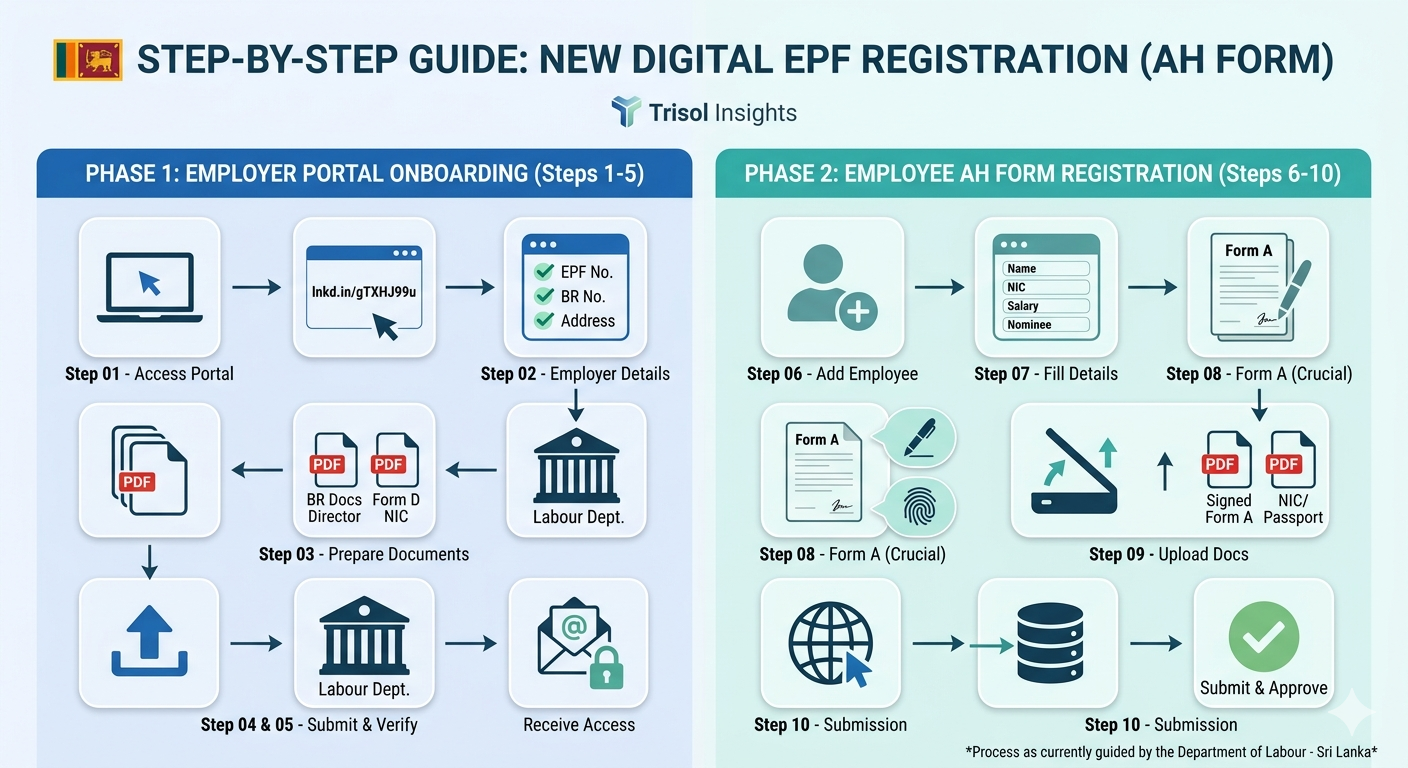
1.Access the Portal Gateway: Step 01.
Visit the official e-Services Digital EPF portal and select “Register Your Company” or “Sign Up” to initiate the corporate onboarding pipeline.
2.Complete Employer Profile Data: Step 02.
Input your exact company credentials matching your formal legal records:
- EPF Employer Number
- Registered Company Name & Address
- Business Registration (BR) Number
- Official Corporate Email & Contact Details
- Authorized Representative Information
3.Compile Compliance Documentation: Step 03.
Prepare clear, scanned PDF copies of your core corporate data:
- Business Registration / Incorporation Documents (Form 1 / Form 20)
- Form D & certified Annexure
- Director / Proprietor National Identity Card (NIC) Copies
- Authorized Signatory & Representative Details
4.Submit Onboarding Request: Step 04.
As currently guided by the Labour Department’s active rollout protocol, complete the structured system form, attach your compiled PDF documentation, and forward them to the relevant designated Labour Department digital desk.
🔑 Phase 2: System Access & Employee Registration
Once the department validates your initial application, your secure corporate dashboard will be activated.
1.Secure Access Credentials: Step 05.
Upon administrative verification, your secure system Username & Password will be issued directly via your registered corporate email address, unlocking full dashboard access.
2.Initiate Employee Enrolment: Step 06.
Log in to the active portal, navigate to the “Employee Registration” workspace, and click “Add New Employee” to begin registering new hires or non-digitized existing staff.
3.Populate Employee Records: Step 07.
Carefully input the worker’s key statutory metrics: Full Name, NIC / Passport Number, Date of Birth, official Date of Appointment, salary baseline data, and detailed Nominee Information. Double-check identity cards closely to avoid systemic alignment delays.
4.Execute and Upload Form A: Step 08.
Download the system-generated FORM A, print it out, and secure the employee’s physical signature alongside their distinct thumbprint/fingerprint impression. Scan the completed document and upload it back into the portal.
5.Final Dispatch and Digital Audit: Step 09 & 10.
Attach supporting files (such as certified NIC/Passport copies), execute a final compliance review of the record, and click Submit. The file is instantly routed to your regional District Labour Office for secure digital sign-off.
💡 Operational Compliance Checklist for HR Teams
To ensure a smooth transition, make sure your payroll and talent acquisition teams align with these practical safeguards:
- The Zero-Tolerance Data Rule: The system matches identity fields against national electronic registries. A single character or digit mismatch between an employee’s portal profile and their physical NIC will trigger an administrative hold.
- File Cleanliness: Keep all scanned uploads crisp, highly legible, and formatted strictly as PDFs to prevent automated gateway rejections.
- Transitional Workflow Sync: As this infrastructure scales island-wide, check in with your local District Labour Office regarding any localized hybrid queues or specific verification variations during the immediate rollout period.
Trisol Insights Takeaway: This digital shift is a massive step forward for corporate compliance in Sri Lanka. Moving away from legacy paper loops protects data integrity, slashes turnaround times, and helps HR departments focus on strategic workforce management rather than manual tracking.
🤝 Let’s build a knowledge-sharing space: Has your organization already initiated onboarding on the new portal? If there are any updates, specific practices, or subtle procedural shifts followed by your regional District Labour Office, please share them in the comments below to help the community stay ahead! 👇
#SriLanka #EPF #DigitalEPF #HRCompliance #PayrollManagement #LabourLaw #HumanResources #TrisolInsights

Authoriy Builder | Business Influencer | HR Specialist | Talent Spotter | Team Builder | Trainer | Administrator | Industrial Relations & Compliance Expert | Forensic Investigator
Previous post
The Strategic Pivot: Elevating Corporate Agility Through Managed HR Outsourcing
You may also like

Inspired by Nature